
Application & Stack Templates
Hubfly space includes a curated marketplace of pre-configured templates for both single-container infrastructure tools (databases, key-value stores, admin portals) and multi-container Compose applications (CMS, ERP, analytics, backend systems).
Zero Configuration Setup
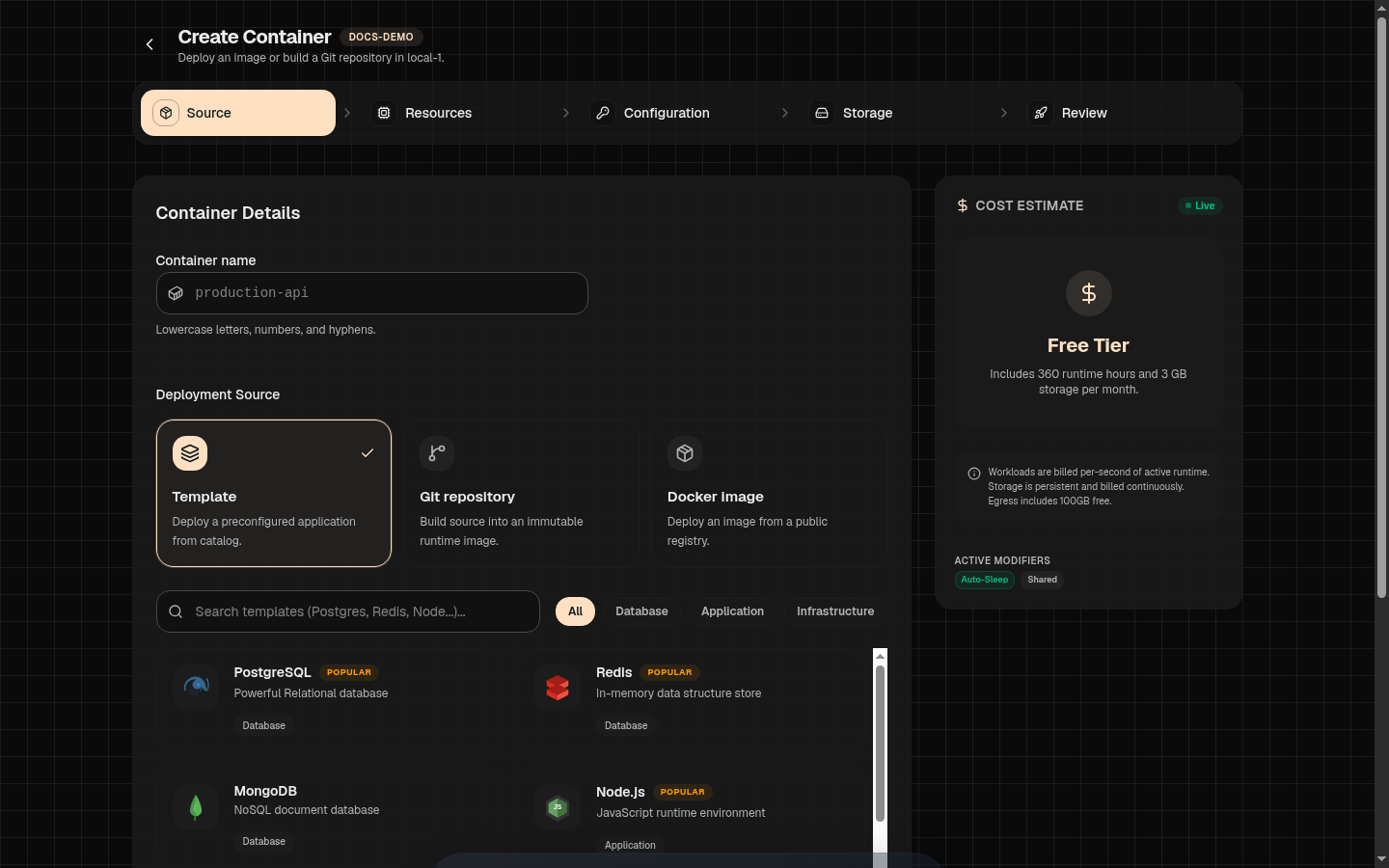
Single-Container Templates
Single-container templates launch individual services with optional pre-attached persistent volumes and default environment parameters.
Relational database pre-configured with POSTGRES_PASSWORD and volume mount at /var/lib/postgresql/data.
In-memory key-value cache with AOF persistence enabled and port 6379 exposed.
Document database with root credentials and persistent volume mounted at /data/db.
S3-compatible object storage server with API port 9000 and Web Console port 9001.
Lightweight web server and reverse proxy with HTML directory volume mount.
Browser-accessible cloud IDE environment with workspace volume persistence.
Web-based SQL query editor and database administration UI.
Visual GUI tool for inspecting Redis keys, memory usage, and pub/sub queues.
High-performance open-source fork of Redis with full protocol compatibility.
Compose Stack Templates
Compose templates deploy multi-container systems with coordinated service startup, internal project networking, dependency gates, and pre-wired database connections.
| Compose Template | Included Services | Default Architecture |
|---|---|---|
| WordPress | wordpress, db (MySQL) | WordPress web service connected to private MySQL container with media upload volume. |
| Ghost | ghost, db (MySQL) | Ghost publishing engine connected to private MySQL with blog content persistence. |
| Directus | directus, database (Postgres), cache (Redis) | Headless CMS engine with Postgres storage and Redis query caching. |
| Metabase | metabase, db (Postgres) | Business intelligence dashboard connected to dedicated Postgres metadata store. |
| PocketBase | pocketbase | All-in-one Realtime backend (SQLite, Auth, Storage) in a single optimized container. |
| Umami | umami, db (Postgres) | Privacy-focused web analytics platform with Postgres data store. |
| Uptime Kuma | uptime-kuma | Self-hosted monitoring tool for HTTP/TCP uptime checks and status pages. |
| Meilisearch | meilisearch | Lightning-fast search engine with index volume mount. |
How To Deploy A Template
1Open New Container
Go to your project workspace and click New Container, then select the Template tab.
2Search Marketplace & Select
Use the search bar or filter by category (Databases, Tools, CMS, Analytics). Click on your desired template (e.g. PostgreSQL or WordPress).
3Review & Customize Defaults
Customize default passwords, container tier (Shared vs Dedicated), CPU/RAM limits, and volume sizes before launching.
4Deploy Service
Click Deploy. Hubfly space provisions containers, networks, and persistent volumes automatically.
Customizing Templates Before Launch
Every template setting can be adjusted during the creation wizard:
- Passwords & Keys: Replace default passwords with custom secrets before deployment.
- Storage Sizing & Mode: Expand volume capacity (e.g. 10 GB to 100 GB) and select High Performance for database IOPS.
- Public Ingress: Choose whether to create a public HTTP endpoint or keep the template private to the project network.
Production Password Security
POSTGRES_PASSWORD or MYSQL_ROOT_PASSWORD) during template setup. Avoid running production databases with default template credentials.