
Architecture & Operating Model
Hubfly space is built around a simple engineering belief: developers should be able to ship real production containers, multi-service stacks, databases, background workers, and GPU workloads without turning every deployment into a custom infrastructure engineering project.
The Hubfly space Philosophy
The Hubfly space 5-Question Framework
When designing any deployment on Hubfly space, evaluate your architecture using these five operational decisions:
| Decision Area | Key Questions & Considerations | Hubfly space Tooling |
|---|---|---|
| 1. Workload Source | What am I running? Git repository, prebuilt Docker image, template, Compose stack, or GPU instance? | Git Builder, Image Registry, Compose Engine |
| 2. State & Persistence | What data outlives container replacement? PostgreSQL data, user uploads, media, model weights? | HubBlock Managed Volumes (Standard, Balanced, High Performance) |
| 3. Public Access | What needs inbound internet traffic? Web app, REST API, webhook endpoint, TCP stream, or custom domain? | Public HTTP/TCP Endpoints, Custom Domains, SSL/TLS, Load Balancers |
| 4. Private Isolation | What should stay hidden from the public internet? Databases, Redis caches, workers, admin interfaces? | Private Project Network (.hubfly.internal), HubTunnels |
| 5. Growth & Operations | How will capacity grow? Vertical CPU/RAM auto-scaling, manual replicas, edge firewall, CI/CD pipelines? | Vertical Auto-Scale, Scale Replicas, Firewall WAF, CLI Automation |
The Platform Layer Model
Hubfly space separates cloud architecture into eight explicit operational layers:
1. Source Layer
Git repos, Docker registry tags, Compose YAML, CLI uploads, GPU templates.
2. Build Layer
Hubfly space Builder stack detection, multi-stage Dockerfiles, build-env scoping.
3. Runtime Layer
Hubcell container engine, shared vs dedicated tiers, vertical auto-scale, health checks.
4. Storage Layer
Managed persistent volumes, HubBlock driver, performance modes, web file browser.
5. Private Network
Project-scoped internal overlay, regional DNS aliases (.hubfly.internal).
6. Edge & Ingress
HTTP/TCP proxies, automated SSL certificates, custom domain transfers, load balancers.
7. Access Layer
HubTunnels for authenticated local SSH port forwarding to private containers.
8. Edge Security
Hubfly space Firewall, rate limiting, IP CIDR policies, restricted paths, bot protection.
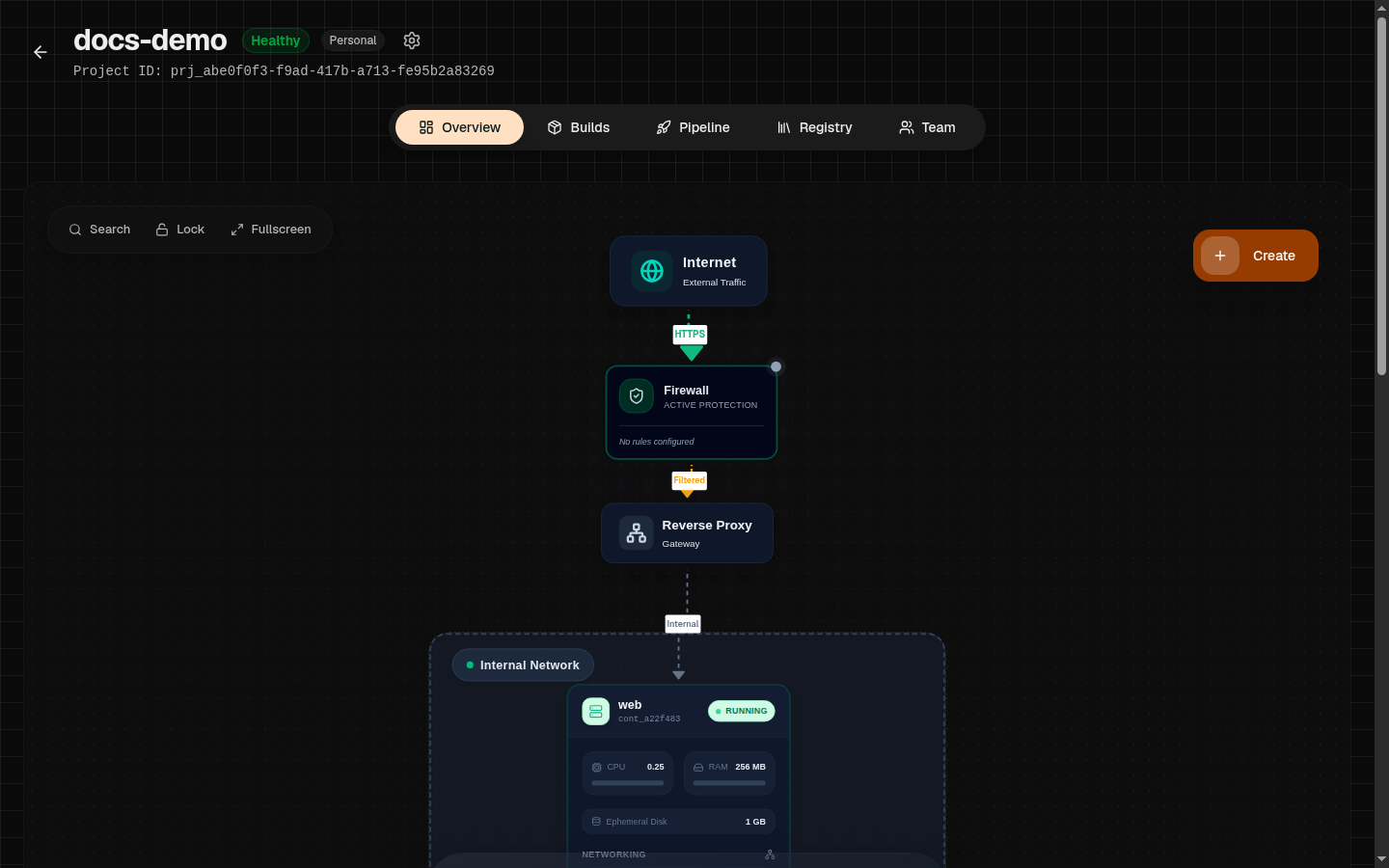
Hubcell Runtime Foundation
Hubfly space runs containers on an internal runtime platform called Hubcell.
Hubcell manages the container execution lifecycle: allocating cgroup resources, wiring network namespaces, attaching persistent storage blocks, streaming live logs, executing shell sessions, and ensuring multi-tenant isolation across regional worker nodes.
No Host Lock-in
Private-First Networking Culture
Production security starts by keeping internal dependencies private by default.
- Internal Traffic: Application-to-database, API-to-Redis, and worker-to-queue connections run across the private project network over internal DNS aliases (e.g.
postgres-db.eu1.hubfly.internal). - Public Traffic: Only entrypoint web applications and APIs receive public HTTP endpoints or custom domains.
- Operator Access: Developers and administrators access private databases or admin panels using short-lived HubTunnels rather than opening public database ports to the internet.