
Deploy From Docker Image
The Docker Image deployment flow lets you run prebuilt OCI or Docker-compatible images directly on Hubfly space. Use this path when your CI/CD pipeline builds container images outside Hubfly space, when you publish tagged images to a container registry, or when you want to deploy official open-source infrastructure tools like PostgreSQL, Redis, Nginx, or MinIO.
When To Use Image Deployments
Supported Registries & Sources
Hubfly space can pull public images and external private OCI-compatible images that are reachable over HTTPS:
| Registry Type | Example Image Reference | Authentication Requirement |
|---|---|---|
| Docker Hub (Public) | nginx:latest or postgres:16-alpine | None (Anonymous pull) |
| GitHub Container Registry | ghcr.io/my-org/backend-api:v2.1.0 | Personal Access Token / GitHub Token (read:packages) |
| GitLab Container Registry | registry.gitlab.com/group/project/service:stable | GitLab Deploy Token or Personal Access Token |
| Harbor / Private Registry | registry.mycompany.com/production/app:v1.4.0 | Registry Username & Password/Token |
| Hubfly space Managed Registry | Hubfly space-generated image tag from CLI deploy | Managed automatically by project credentials |
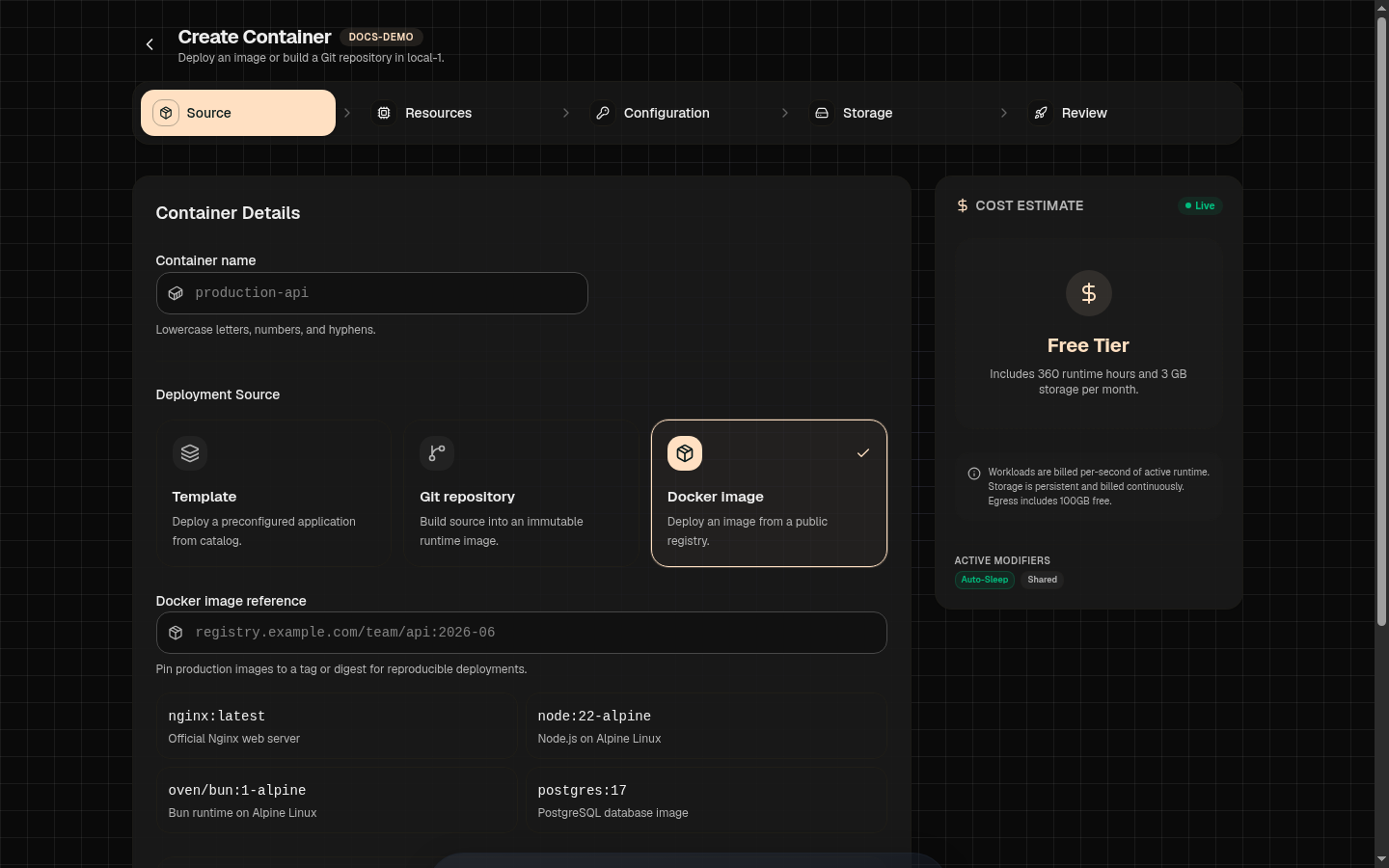
Image Reference Syntax & Tagging
An image reference specifies the registry host, organization, image repository, and tag.
Production Tagging Best Practices
- Avoid Floating Tags: Avoid using
:latestor:mainin production. Floating tags make rollbacks unpredictable because the underlying image layer can change without updating the container reference. - Use Immutable Version Tags: Tag production images with semantic versions or git commit SHAs (e.g.
:v1.4.2or:sha-7f3b1a9). - Digest Pulls: For maximum immutability, pull by SHA256 digest:
ghcr.io/acme/api@sha256:e3b0c44298fc...
Step-by-Step Image Deployment
1Open Container Setup
Open your project in the Hubfly space dashboard, click New Container, and select the Docker Image tab.
2Enter Image Reference
Paste your full image reference into the input field (e.g. redis:7-alpine or ghcr.io/acme/worker:v2.0.1).
3Configure Private Registry Access (If Required)
If the image is hosted in a private repository, toggle Private Registry Credentials:
- Public image: No credential is needed when the registry permits anonymous pulls.
- Saved Registry Credential: Stores the external registry URL and pull credential encrypted in the project for future redeployments. See the registry reference for the exact fields.
4Runtime & Command Overrides
Optionally override the image's default ENTRYPOINT or CMD instructions, set environment variables, select CPU/RAM sizing, attach persistent volumes, and click Deploy.
Entrypoint & Command Overrides
By default, Hubfly space executes the entrypoint and command baked into the Dockerfile image header. You can override these instructions to run secondary background processes, queue workers, or custom startup scripts.
Argument Formatting Rules
Example A: Custom Worker Command
Overrides the container default command to run a Celery queue worker, one argument per line:
command (array)
Example B: Shell Entrypoint Exec
Overrides the entrypoint to execute a shell script before launch:
entrypoint (array)
Stateful Images & Volume Attachments
When deploying database images or media servers, runtime files written to unmounted container directories will be lost if the container restarts or updates. Attach a Managed Volume to ensure data persistence.
| Workload Image | Container Target Mount Path | Recommended Storage Mode |
|---|---|---|
postgres:16 | /var/lib/postgresql/data | High Performance (Low IOPS latency) |
redis:7 | /data | High Performance or Standard |
minio/minio | /data | Balanced (Large file throughput) |
nginx:latest | /usr/share/nginx/html | Standard |
Redeploy after publishing a new image
A successful push to GHCR, Docker Hub, or your private registry does not replace a running Hubfly space container automatically. Configure a deployment pipeline webhook for the container, then call its generated endpoint from CI with{"action":"pull"}. The webhook guide covers URL-token and Secure HMAC modes, GitHub Actions signing, allowed actions, and deployment troubleshooting.
Keep the image reference deterministic
ghcr.io/acme/backend:sha-7f3b1a9 or an @sha256:... reference. A moving tag can make it difficult to identify which image a deployment pulled.Troubleshooting Image Deployments
| Symptom | Likely Cause | Resolution |
|---|---|---|
manifest for repo not found | Image tag does not exist or image name is misspelled. | Verify image name and tag in registry. |
unauthorized: authentication required | Private image pulled without valid credentials. | Add a Saved Registry Credential with package read permissions. |
exec format error | Architecture mismatch (e.g. ARM64 image on x86 node). | Build multi-architecture images or target linux/amd64 in CI. |
Endpoint 502 / Connection Refused | App listening on 127.0.0.1 instead of 0.0.0.0. | Ensure app binds to all interfaces (0.0.0.0) and matches container port. |
| Redeploy still uses the old image | The container was not redeployed after a tag was replaced, or a floating tag was cached. | Call the deployment webhook after publishing, prefer a new immutable tag, and confirm the resulting image digest in the Dashboard. |